阿里云STS授权使用记录
在大多数业务中,涉及到上传文件,如果基数大容易导致服务器容量不足,那么可以采用OSS存储,不仅可以节省服务器容量,开通CDN还能加快访问速度.
#### 前提 上传到OSS也有几种方式: - web直传,不需要后端参与,但容易暴露key和secret - web直传后端签名. 由后端生成签名,前端负责获取签名并上传. - 直接上传到业务服务器,再由业务服务器上传到OSS. 步骤有点多余了. - 采用STS授权访问,前端断点续传方式上传到OSS
#### 创建RAM用户
- 首先登陆阿里云RAM访问控制台进行添加RAM用户.
 - 创建完毕后,添加对应权限
- AliyunOSSFullAccess
- 创建完毕后,添加对应权限
- AliyunOSSFullAccess 管理对象存储服务(OSS)权限
- AliyunSTSAssumeRoleAccess 调用STS服务AssumeRole接口的权限
- 当然也可以使用信任策略管理添加对应的权限,但是我图方便,直接添加权限即可.
#### 添加用户
- 添加完RAM角色后,还需要添加一个用户用于调用API
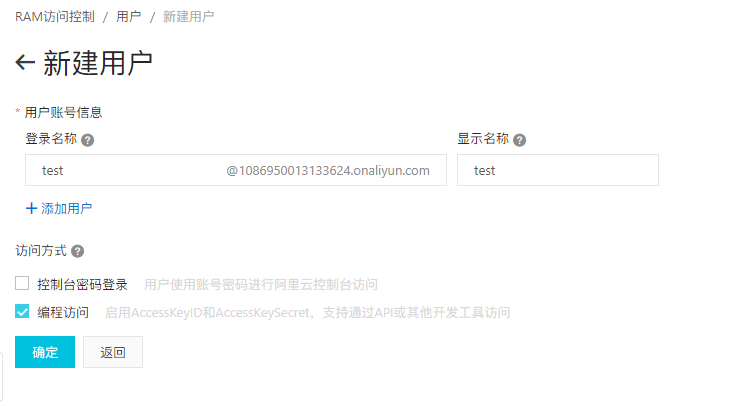
- 创建完成后,记录AccessKeyID和AccessKeySecret
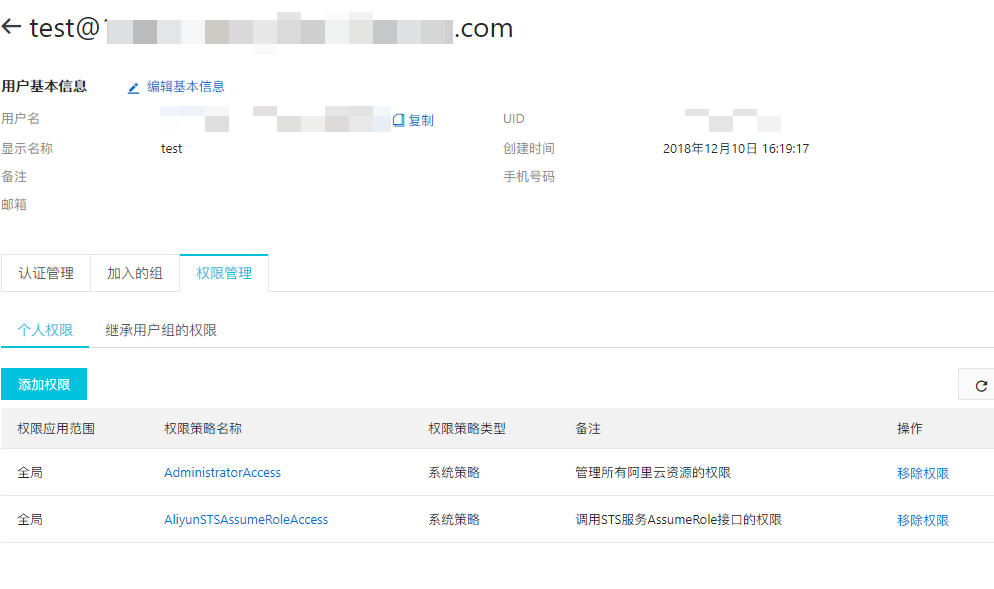
 - 为该用户添加权限(如果是对多用户授权,可以使用用户组的功能)
#### 代码 服务端代码
packagist : composer require  anchnet/aliyun-openapi-php-sdk="dev-master"
<?php

require_once 'vendor/autoload.php';

use Sts\Request\V20150401 as STS;

$accessKeyId = '<your user accessKeyId>';
$accessKeySecret = 'your user accessKeySecret';

$sts = new STS\AssumeRoleRequest();
// Arn可在https://ram.console.aliyun.com/roles对应的角色详情获取
$sts->setRoleArn('acs:ram::<your user id>:role/<your ram user>');
$sts->setRoleSessionName('<your ram username>');

$sts->setDurationSeconds(1000);

$iClientProfile = DefaultProfile::getProfile('<end-point>', $accessKeyId, $accessKeySecret);
$client = new DefaultAcsClient($iClientProfile);

$response = $client->getAcsResponse($sts);

exit(json_encode($response->Credentials));
web端代码
<!DOCTYPE html>
<html>
<head>
    <script src="http://gosspublic.alicdn.com/aliyun-oss-sdk-4.10.0.min.js"></script>
</head>
<body>
<input type="file" id="uploadFile"/>
<script type="text/javascript">
    stsAccessKeyId = "";
    stsAccessKeySecret = "";
    stsToken = "";
    var checkpoint_temp;

    /**
     * @param storeAs String 存储名
     * @param file    FileObject 文件
     * @param cpt
     **/
    function multipartUploadWithSts(storeAs, file, cpt) {
        // 请求业务服务器获取securityToken
        OSS.urllib.request("http://localhost:8181/server.php", {method: 'GET'}, function (err, response) {
            if (err) {
                // 如果请求错误,则直接跳出
                return alert(err);
            }
            try {
                // 解析业务服务器返回的sts所需信息
                result = JSON.parse(response);
            } catch (e) {
                errmsg = 'parse sts response info error: ' + e.message;
                return alert(errmsg);
            }
            // 创建client对象
            client = new OSS.Wrapper({
                accessKeyId: result.AccessKeyId,
                accessKeySecret: result.AccessKeySecret,
                stsToken: result.SecurityToken,
                bucket: 'foruptest',
                endpoint: 'http://oss-cn-shenzhen.aliyuncs.com',
                region: 'oss-cn-shenzhen'

            });
            multitest(client, storeAs, file, cpt);
        })
    }

    var upload = function () {
        var client = null;
        // 文件信息
        var file = document.getElementById('uploadFile').files[0];
        // 文件名 - 可随机
        /*var storeAs = file['name'];*/
        var date = new Date();
        var storeAs = date.getFullYear() + '/' + date.getMonth() + '/' + date.getDate() + '/' + file['name'];

        multipartUploadWithSts(storeAs, file)
    };

    function multitest(ossClient, storeAs, file, cpt) {
        var checkpoint_temp;
        if (cpt) {
            console.log("multitest with cpt");
            ossClient.multipartUpload(storeAs, file, {
                parallel: 2,
                checkpoint: cpt,
                progress: function* (percent, cpt) {
                    console.log('Progress: ' + percent);
                    checkpoint_temp = cpt
                }
            }).then(function (result) {
                console.log(result);
            }).catch(function (err) {
                console.log(err);
                multipartUploadWithSts(storeAs, file, checkpoint_temp)
            });
        } else {
            console.log("multitest without cpt");
            ossClient.multipartUpload(storeAs, file, {
                parallel: 2,
                progress: function* (percent, cpt) {
                    console.log('Progress: ' + percent);
                    checkpoint_temp = cpt
                }
            }).then(function (result) {
                console.log(result);
            }).catch(function (err) {
                console.log(err);
                // 如果上传发生错误,则会一直请求业务服务器获取security token
                multipartUploadWithSts(storeAs, file, checkpoint_temp)

            });
        }

    }

    // 选择文件后,触发对应事件.
    document.getElementById('uploadFile').onchange = upload;
</script>
</body>
</html>
具体如何实现暂停,续传还需要前端进行配合,我是个前端渣.
注: 要使用该功能,需要允许bucket允许跨域,具体设置
 ETag:如果没有设置暴露该header头,上传稍微大一点的文件(比如2M)就会出现
One or more of the specified parts could not be found or the specified entity tag might not have matched the part's entity tag 错误.
- 如何处理?
- 阿里云推荐设置
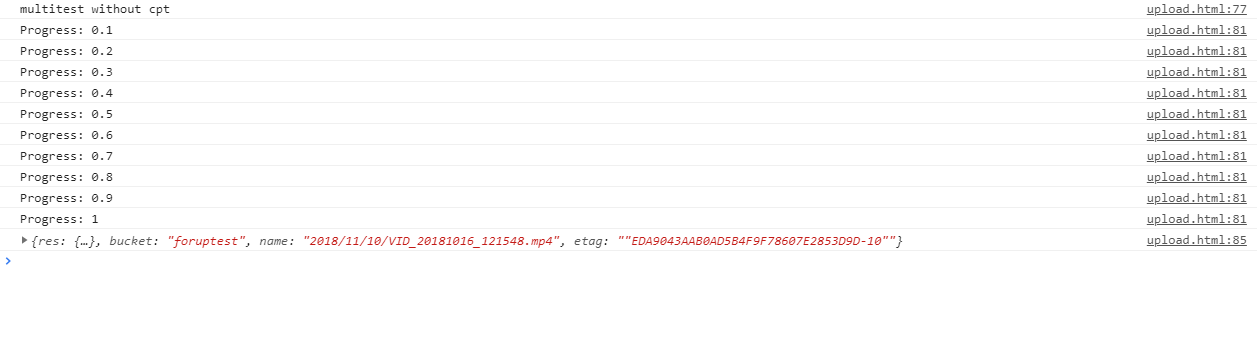
成果:
references - https://yq.aliyun.com/articles/178451 - https://help.aliyun.com/document_detail/31935.html?spm=a2c4g.11186623.2.11.685579b0dbAa8Y#concept-mgc-4tf-vdb - https://www.alibabacloud.com/help/zh/doc-detail/32203.htm - https://help.aliyun.com/document_detail/42775.html?spm=a2c4g.11186623.6.1281.71fb18c9UaS8Jj - https://help.aliyun.com/document_detail/32106.html?spm=a2c4g.11186623.6.822.738a2324sI3JS8#h2-url-2